
Blog Post
Software in Supply Chain Management: A 7-Step Venue Guide
Use software to connect venue demand, suppliers, purchase orders, receipts, event setup, and returns. Includes a 180-guest worked example.
VenueBill Team
VenueBill is a booking and billing platform for wedding and event venues.
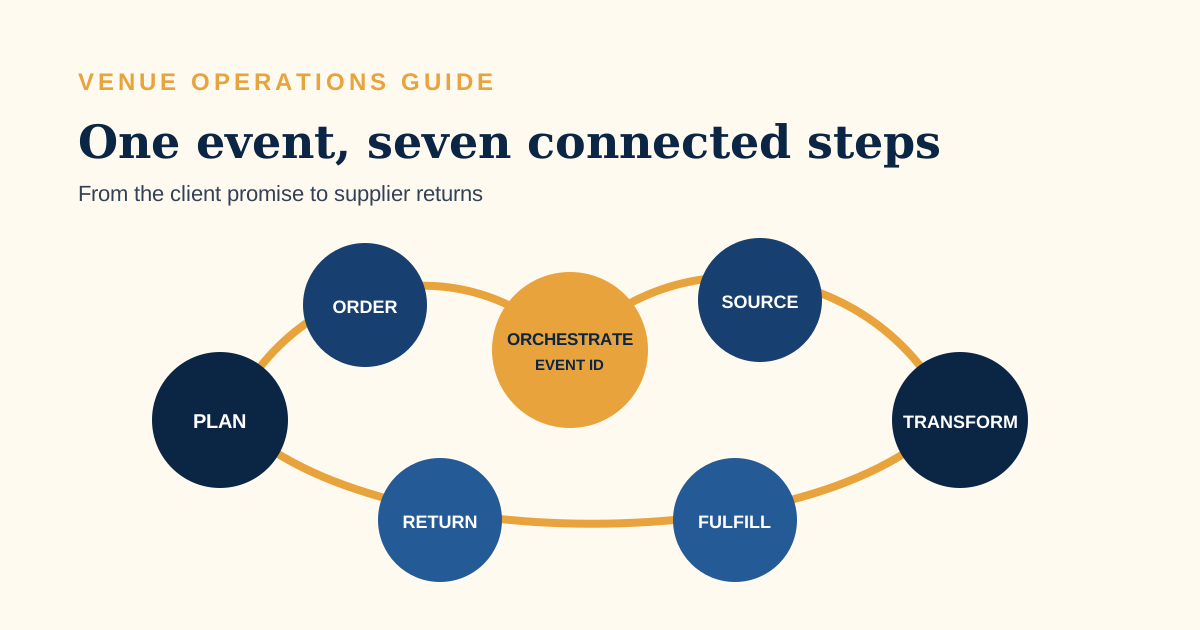
Software in supply chain management connects demand, supplier orders, deliveries, service execution, invoices, and returns so one change can be traced from the customer promise to the vendor response. For an event venue, that means a revised guest count updates the catering order, rental quantity, staffing plan, and event cost before setup begins. Use the seven-step guide below to build that flow without buying an enterprise system for a single venue.
Search results for this query are mostly definitions, software-category comparisons, and implementation guides. A venue needs all three in smaller form. The Association for Supply Chain Management's SCOR Digital Standard organizes supply-chain work into seven processes: Orchestrate, Plan, Order, Source, Transform, Fulfill, and Return. That framework can map a wedding from signed scope to returned rentals even though a venue delivers a service rather than shipping a manufactured product.
What does supply chain software do for an event venue?
Supply chain software gives an event venue one traceable path from what the client bought to what suppliers must deliver. It tracks quantities, dates, owners, confirmations, receipts, changes, and costs across outside caterers, rental companies, beverage distributors, florists, and internal staff.
VenueBill handles the customer-side booking record: proposal, contract, deposit, payment schedule, and balance. Purchasing, warehouse, and supplier management sit outside its scope. A venue that buys and receives significant event stock may pair booking software with accounting, purchasing, inventory, or project tools. The event venue software comparison helps separate those categories before a team shops for one oversized suite.
Which software category controls each handoff?
Each software category should control the handoff it is designed to record, with a shared event ID linking the records. Buying one “all-in-one” product does not fix duplicate ownership or unclear status.
| Record | System type | Authoritative status |
|---|---|---|
| Client scope and price | Proposal and contract software | Accepted package, signed terms, approved changes |
| Client money | Venue billing software | Deposit, installments, refunds, remaining balance |
| Supplier commitment | Purchasing or accounting software | Purchase order, confirmation, unit cost, expected date |
| Reusable stock | Inventory or asset software | Available, allocated, damaged, returned quantity |
| People and work | Project and HR software | Task owner, shift, deadline, completion |
A task platform is useful once the system knows what changed. Our free project management software guide compares plan limits and upgrade costs for a six-person events team.
How do you map the seven supply chain steps?
A venue can map the seven SCOR processes to one event by naming the record created at each step. The process names come from ASCM; the venue mapping below is ours.
- Orchestrate: set supplier rules, approval limits, contract terms, risk owners, and event IDs.
- Plan: convert guest count, package, room, and timeline into quantities and labor demand.
- Order: capture the client's confirmed services, price, payment state, and changes.
- Source: issue purchase orders or booking confirmations to suppliers and record their promises.
- Transform: schedule prep, room setup, food service, bar service, and other work that creates the event experience.
- Fulfill: receive goods, execute the event, invoice approved additions, and obtain client acceptance where needed.
- Return: send rentals back, document damage, reconcile unused consumables, and close supplier credits.
ASCM defines a perfect customer order through seven rights: the right product or service, quantity, condition, place, time, customer, and cost. That is a useful event-day test. Two hundred chairs delivered after the ceremony are the correct quantity and the wrong fulfillment.
What does the workflow look like for a 180-guest wedding?
A 180-guest wedding exposes supply problems early when the software compares required, confirmed, and received quantities instead of storing a PDF order alone. Consider this hypothetical Friday receiving report for a Saturday event.
| Item or service | Required | Supplier confirmed | Received or staffed | Variance and action |
|---|---|---|---|---|
| Guest meals | 180 | 180 | 180 prep count | 0; release kitchen plan |
| Ceremony chairs | 200 | 200 | 196 usable | -4; move 4 venue backup chairs |
| Table linens | 24 | 24 | 22 | -2; supplier redelivery by 4 p.m. |
| Service staff | 12 | 12 | 11 checked in | -1; call approved backup |
| Sparkling water | 18 cases | 18 cases | 20 cases | +2; record return eligibility |
The report turns five observations into assigned work. The chair shortage is covered from venue stock. The linen supplier owns a timed redelivery. The staffing lead calls one backup. Two water cases become a return or a documented stock increase. None of those actions requires an enterprise planning engine; each requires a comparison, an owner, and a deadline.
How should client changes update supplier orders?
A client change should update supplier orders through a controlled change record that shows the old quantity, new quantity, price effect, approver, and affected deadline. Editing a proposal without updating procurement leaves the venue paying for one version while promising another.
Suppose the guest count rises from 160 to 180 at $72 per catered guest. The client change adds $1,440. The same approval should generate a catering-order increase of 20 meals, a seating check, a linen check, and a staffing review. If the caterer's cutoff has passed, the record should flag the exception before anyone promises availability.
The client-facing invoice and signed change belong with the event; the supplier amendment belongs in purchasing. A shared change ID ties them together. For venues that run several rooms or overlapping receptions, the banquet hall software comparison follows the workflow from inquiry through final balance and BEO-style operations.
Which three metrics should a small venue track?
A small venue should track supplier on-time-in-full rate, event requirement variance, and change-to-order cycle time. Three well-defined measures beat a dashboard of totals nobody acts on.
- Supplier on-time-in-full: confirmed supplier lines received complete by the promised time ÷ total due lines.
- Event requirement variance: received or allocated quantity minus the final approved requirement.
- Change-to-order cycle time: hours from an approved client change to updated supplier confirmation.
For the five-line receiving report above, three lines arrived complete as promised: meals, linens as later redelivered, and water. If chairs and staffing missed the committed quantity at first check, first-pass on-time-in-full is 3 ÷ 5, or 60%. That figure is our calculation from the hypothetical example. Track the corrected result too, but do not erase the initial miss.
How do you implement the workflow without overbuying?
A venue can implement the workflow by piloting one event, one supplier category, and one shared event ID before adding integrations. Pick a real failure point such as rentals or catering. A software catalog can wait.
- Choose one upcoming event and freeze its approved client scope.
- List every supplier promise with quantity, due time, owner, and confirmation state.
- Assign one authoritative system to each record type.
- Use the same event ID in the booking, purchase order, task board, and receipt.
- Run the required-confirmed-received comparison 48 hours before setup and again at receipt.
- Record returns, credits, damage, and final supplier invoices before closing the event.
- Review the three metrics and automate only the handoff that failed.
Staffing is part of the supply plan as soon as the service promise depends on it. The 18-person venue HR software example shows how scheduling and recordkeeping costs change when a venue adds a dedicated people system.
The pilot succeeds when a guest-count change reaches every affected supplier record and the receiving report exposes shortages before guests arrive. Once that works for three events, the venue has evidence for the next integration or purchase.
Frequently Asked Questions
Quick answers to the questions readers ask most about this topic.
What is software in supply chain management?
Does an event venue need enterprise supply chain software?
Is VenueBill supply chain management software?
Which supply chain metric should a venue start with?
Put your next booking on a payment schedule
Keep the couple, event date, deposit, contract, and final balance together. Create your account, set up your venue, and start with one event.
Card required, no charge today. Pro renews at $39/month after 14 days unless canceled.