
Blog Post
Event Management Platform: Seven Handoff Mistakes to Test
Avoid seven event management platform mistakes by testing ownership, permissions, payments, exports, capacity, and failure handling.
VenueBill Team
VenueBill is a booking and billing platform for wedding and event venues.
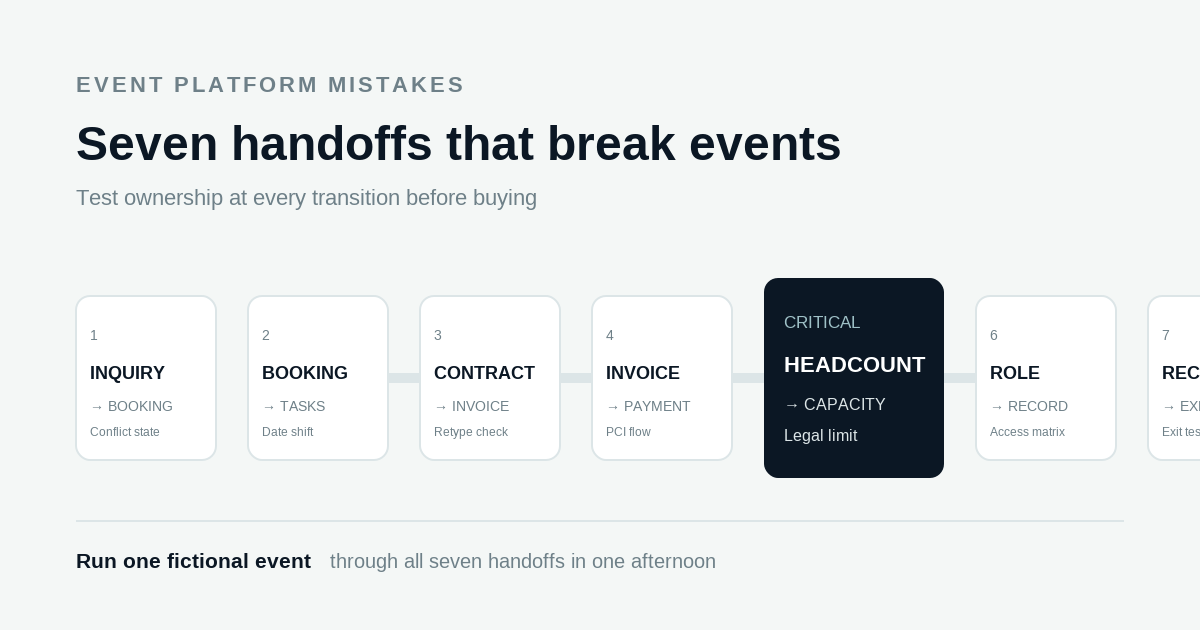
An event management platform fails when a task crosses from one person or system to another without a clear owner. Test seven handoffs before buying: inquiry to booking, booking to task list, contract to invoice, invoice to payment, headcount to room capacity, staff access to customer data, and live records to export.
This is a mistake guide for venue operators, not another feature ranking. Each test starts with a deliberately messy sample event because a polished demo rarely shows what happens when a date, balance or guest count changes.
Why is choosing the broadest event platform a mistake?
The broadest event management platform may solve the wrong event job. Registration platforms organize attendees and tickets. Planner tools coordinate vendors and schedules. Venue systems hold dates and collect money. A long feature list can hide a weak handoff at the exact point your team needs to move work.
Write one sentence that defines the platform's job. For a venue it might be: "Turn an inquiry into a dated booking with a signed agreement and a settled balance." Compare that scope with our three-way venue event management comparison before evaluating extra modules.
What breaks between an inquiry and a confirmed booking?
The inquiry-to-booking handoff breaks when tentative and confirmed dates have no distinct states. Create two inquiries for the same room and date. Mark one tentative, then attempt to confirm the other. The platform should make the conflict visible without relying on a staff member's memory.
Next, change the date and space. Check whether the customer record, task list, contract and invoice still point to the same event. The test concerns linked records, not the color of the calendar.
Why do generic task lists lose event context?
Task management loses value when a task has no event, owner or due-date rule attached. "Send final details" is ambiguous. "Jordan sends the final BEO for the Oak Room event 14 days before 18 June" can be audited.
Build five tasks for one sample event, reassign two, move the event by seven days and inspect every deadline. If relative dates stay fixed while the event moves, the platform has created manual repair work. A banquet event order template can help define the operational details that the task handoff must deliver.
How does a contract become the wrong invoice?
A contract-to-invoice mistake occurs when staff retype the event total or payment terms. Create a $6,500 sample booking with a 25% deposit. The deposit is $1,625, and the remaining balance is $4,875. Then change one line item by $400 and verify which document updates, which requires approval and what the customer sees.
The tracked fictional example supplies a $6,500 contract value and a 25% deposit rate. The tracked calculator divides percentages by 100: $6,500 ÷ 100 = $65 per percentage point, so 25 × $65 = $1,625. Subtracting that deposit from $6,500 leaves a $4,875 balance. These are planned sample amounts, not recorded payments or customer results.
Why should payments stay out of email and spreadsheets?
Payment details should move through a purpose-built payment flow rather than email or an unprotected spreadsheet. PCI SSC says organizations outsourcing payment or security-related services should establish how PCI DSS compliance information will be shared and what evidence the provider will supply.
Test the invoice-to-payment handoff with a small transaction in a safe test environment if the vendor provides one. Confirm that payment status returns to the event, refunds reconcile, failed payments create an alert and ordinary staff cannot view sensitive card data. VenueBill's payment help page distinguishes online, manual and partial payment recording; use the same vocabulary when documenting your own test.
What happens when the headcount approaches room capacity?
A platform should preserve the approved capacity and make a rising guest count visible. Confirm the allowed occupancy and current layout with the authority responsible for the actual venue; this checklist does not establish a legal limit.
Enter the locally approved number from the venue's current documents, then test one event below it and one above it. Do not let software calculate a legal limit from an invented seating ratio. The platform is a place to record and alert on the authoritative number; the authority and documents that govern the venue determine what applies.
How much customer access is too much?
Customer and staff permissions should follow the smallest access needed for the job. A coordinator may need guest and schedule details without subscription settings. A client may need invoices without internal notes. A temporary vendor may need one event for one week.
Create four roles and view the same sample event through each one. Try direct links as well as menus. Record who can see, edit, export and delete. A role name such as "staff" proves little until the actions are tested.
Why is skipping an export test expensive?
An export test reveals whether the platform can return usable event history when a contract ends or an integration fails. Export the sample event and check the customer record, dates, contract, invoice, payment status, tasks and attachments. Open the files outside the platform.
Also ask how long exports take and whether they require support. A CSV of contacts is not a complete exit if signed agreements and payment history remain behind.
How can a venue run all seven tests in one afternoon?
A venue can run the tests with one fictional booking and a written scorecard. Use the $6,500 example above, an invented date and your own approved room limit. Nothing should be sent to a real customer.
| Handoff | Change to make | Evidence to save |
|---|---|---|
| Inquiry → booking | Confirm a conflicting date | Conflict warning |
| Booking → tasks | Move event by 7 days | Deadline changes |
| Contract → invoice | Add $400 line item | Approval and audit trail |
| Invoice → payment | Record partial payment | New balance and status |
| Headcount → room | Exceed approved limit | Capacity alert |
| Role → record | Use four logins | Access matrix |
| Record → export | Download the event | Opened files |
Score each handoff "works," "manual step," "unclear," or "fails." Do not combine those labels into a fake percentage. A failed payment or capacity handoff can outweigh five convenient features.
Frequently asked questions about event management platforms
Frequently Asked Questions
Quick answers to the questions readers ask most about this topic.
What is an event management platform?
What is the most common event platform mistake?
How should a venue test an event management platform?
Can an event platform determine a room capacity?
Put your next booking on a payment schedule
Keep the couple, event date, deposit, contract, and final balance together. Create your account, set up your venue, and start with one event.
Card required to start. Cancel anytime in the first 14 days and pay nothing; Pro is $39/month after the 14-day trial unless canceled.