
Blog Post
Inventory Management System for Event Stock: A 6-Step Setup
Build an inventory management system for event stock with item IDs, locations, par levels, event allocations, buffers, and variance counts.
VenueBill Team
VenueBill is a booking and billing platform for wedding and event venues.
An inventory management system for an event venue should track each item by ID, usable quantity, location, event allocation, and reorder point. Set it up in six steps: define the item record, count usable stock, map locations, reserve stock by event, set par levels, and reconcile returns after each event. The system works when it can warn that Friday and Saturday together require 253 chairs while the venue owns only 240.
Earlier VenueBill guides cover what inventory software should do and how to count a storage room. This guide answers a narrower operational question: how do you turn a count into availability for specific events? The method works in a spreadsheet for a small room, but software earns its place when several events compete for the same stock.
What should every inventory item record contain?
Every inventory item record should contain a stable item ID, a plain name, a unit of measure, usable quantity, current location, condition, replacement cost, and the events that have reserved it. “Chair” is too broad if the venue owns black folding chairs, walnut cross-back chairs, and gold chiavari chairs that cannot substitute for one another.
Use the manufacturer's identifier when one exists, or create a short internal ID such as CHR-XB-WAL. GS1 says a Global Trade Item Number can uniquely identify trade items that are priced, ordered, or invoiced in a supply chain. A venue does not need to buy barcodes for every centerpiece, but it does need one unambiguous ID for every stock type.
| Field | Example | Reason |
|---|---|---|
| Item ID | CHR-XB-WAL | Prevents two chair styles sharing one count |
| Unit | Each | Keeps cases, bottles, and individual pieces distinct |
| Usable quantity | 240 | Excludes broken or quarantined stock |
| Location | North barn, Bay 2 | Makes the count physically checkable |
| Replacement cost | $118 | Supports repair and damage decisions |
If you are still selecting fields or comparing products, use the venue inventory software checklist before importing data. Changing the record structure after hundreds of items are loaded is slow and error-prone.
How should a venue count usable stock?
A venue should count usable stock separately from on-hand stock. If 240 chairs are in the building and 7 need repair, availability is 233 until those 7 return to service. The inventory record can retain both numbers, but allocation must use the usable count.
Count one location at a time and freeze movement while that location is open for counting. Tag items that need repair instead of leaving a note in another file. The longer four-step setup in our inventory management programs guide is useful for the first physical walkthrough; this system begins once the baseline count is trusted.
How should storage locations be mapped?
Storage locations should be mapped from building to room to bay or shelf, using names staff can read on a sign. “Back storage” fails when three rooms fit that description. A location code such as NB-B2-S3 can point to North Barn, Bay 2, Shelf 3 without replacing the plain label.
Record each movement between locations. SAP's inventory management documentation says a document is created for every transaction, producing an audit trail of goods movements. A small venue can apply the same rule without adopting warehouse complexity: one item, from location, to location, quantity, person, and timestamp.
How do you reserve inventory for two events?
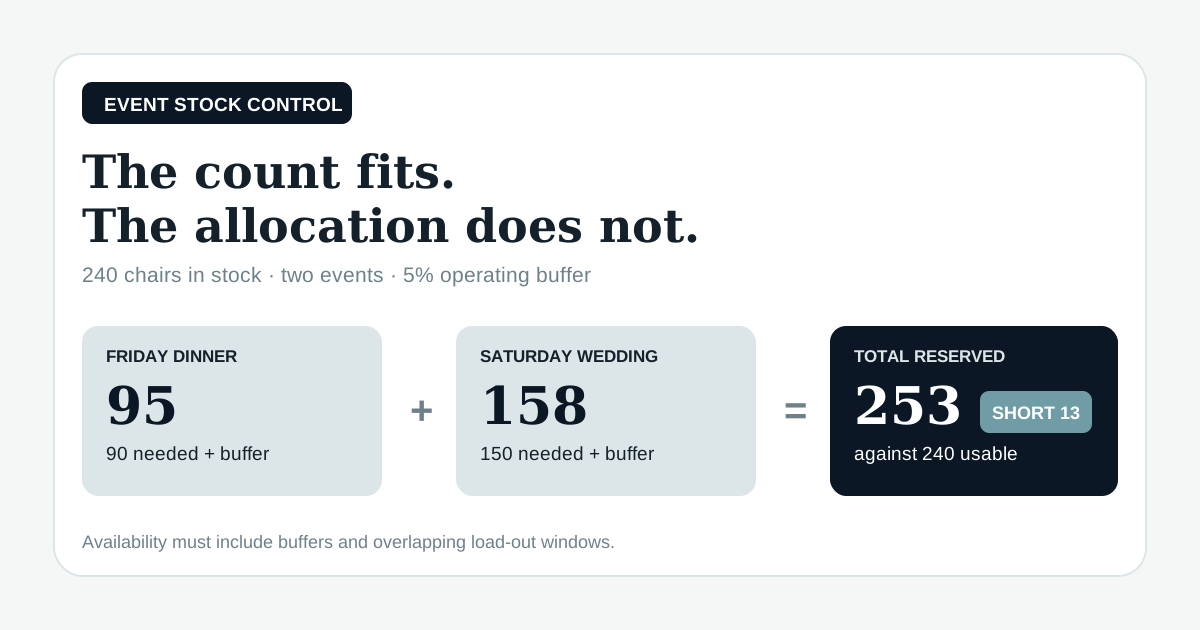
You reserve inventory for two events by allocating each event's required quantity plus its operating buffer, then comparing the combined allocation with usable stock across overlapping setup and return windows.
Consider 240 usable walnut cross-back chairs. Friday's dinner needs 90 chairs and Saturday's wedding needs 150. The venue uses a 5% buffer for last-minute damage or layout changes and rounds up to whole chairs.
| Event | Base need | 5% buffer | Reserved quantity |
|---|---|---|---|
| Friday dinner | 90 | 4.5, rounded up | 95 |
| Saturday wedding | 150 | 7.5, rounded up | 158 |
| Combined | 240 | 13 | 253 |
The venue is short 13 chairs because 95 + 158 = 253 and only 240 are usable. A count-only spreadsheet says the base demand fits exactly. An event-aware inventory system catches the buffer and the overlap before the second contract promises 150 matching chairs.
The setup window decides whether the events truly overlap. If Friday's chairs are cleaned, inspected, and returned before Saturday load-in, the same stock may be used twice. Record the allocation from load-out through expected return rather than limiting it to guest hours.
How do you set a par level and reorder point?
You set a par level from expected demand during supplier lead time plus a safety quantity, then compare that target with available stock. Infor's 2026 inventory documentation says the par level “acts as the reorder point” and stores lead-time days and a minimum order quantity beside it.
For bottled sparkling water, suppose the venue expects to use 18 cases before the next normal delivery and keeps 4 cases as safety stock. Its par level is 22 cases. If the system shows 9 available cases after allocations, the suggested order is 13 cases: 22 target minus 9 available.
Do not use one formula for reusable chairs and consumable drinks. Chairs trigger rental, repair, or replacement decisions around booked events. Drinks trigger purchasing from forecast consumption and delivery time. For subscription, setup, hardware, and integration ranges, see the cloud inventory management cost guide.
How should food and beverage stock be handled?
Food and beverage stock should add lot or delivery date, opened date, use-by date, and storage temperature where local rules require them. The U.S. Food and Drug Administration's 2026 Food Code is a model used by regulators for retail and food-service rules; its cold-holding provisions use 41°F, or 5°C, for time-and-temperature-control foods. A venue must follow the code adopted in its own jurisdiction.
Keep temperature logs and stock counts connected by item and location, but do not pretend a quantity field is a food-safety system. The inventory record can flag a case as quarantined after a temperature problem. A trained manager still decides disposal under the venue's approved procedures and local requirements.
How should returned stock be reconciled after an event?
Returned stock should be reconciled against the event allocation within one shift. Code each difference as returned, consumed, damaged, missing, or still in use. By the next weekly count, it may be impossible to tell which event caused the variance.
For the Friday dinner, staff scan or count 95 reserved chairs on load-out and 94 on return. One is marked damaged with a photo and moved from usable stock to repair. Saturday's available quantity then falls before load-in, and the rental decision is based on 239 usable chairs rather than yesterday's 240.
Create one task from the variance: inspect, repair, replace, bill under a contract when appropriate, or update the par. Inventory records explain what moved. Task management gives the follow-up a person and deadline.
Does VenueBill include an inventory management system?
VenueBill does not list inventory tracking as a product feature. It handles venue booking and billing, including date holds, deposits, payment schedules, e-sign contracts, and the couple portal. A dedicated inventory system should link its allocation to the event ID or date without copying sensitive client or payment data into the stock record.
This is one reason a venue may use more than one focused tool. Our venue management system explainer covers the broader decision about when a single suite helps and when a smaller booking system paired with specialist software is easier to run.
How do you verify the system before the next event?
You verify an inventory management system by running one deliberate conflict through it. Allocate more chairs than the venue owns, move ten items to another location, mark one item damaged, and lower a consumable below par. The system should show the shortage, preserve the movement history, reduce usable stock, and create or support a reorder action.
Finish with a spot count. Pick five item IDs and have someone who did not build the database locate and count them from the record alone. Any miss points to a naming, location, or process problem that should be fixed before staff rely on the number during load-in.
Frequently Asked Questions
Quick answers to the questions readers ask most about this topic.
What is an inventory management system for an event venue?
How do you prevent event inventory from being double-booked?
What is a par level in inventory management?
Does VenueBill track chairs, linens, or beverage stock?
Put your next booking on a payment schedule
Keep the couple, event date, deposit, contract, and final balance together. Create your account, set up your venue, and start with one event.
14-day trial, card required. Pro is $39/month, Premium is $59/month. Your selected plan starts after the trial unless you cancel.
More from the blog
Best Venue Management Software: 4 Options Compared
Compare four venue and event management software options by fit, booking workflow, key features, and published pricing.
Cloud Inventory Management: The Year-One Cost Math for a Small Team
Cloud inventory management costs $50 to $300 a month for most small businesses, per inFlow. Year-one math for a small team, setup and hardware included.
Venue Management System: What It Is and Who Actually Needs One
A venue management system bundles sales, floor plans, and CRM with a booking calendar. Here's what's inside one, what it costs, and when you need less.
Compare VenueBill for venue operations
See how VenueBill fits alongside the tools wedding and event venues consider for bookings and billing.