
Blog Post
Venue Booking Software Workflow: 7 Checks Before a Date Locks
Follow a venue booking software workflow from inquiry to signed contract, with checks for date holds, deposits, e-signatures, and failed payments.
VenueBill Team
VenueBill is a booking and billing platform for wedding and event venues.
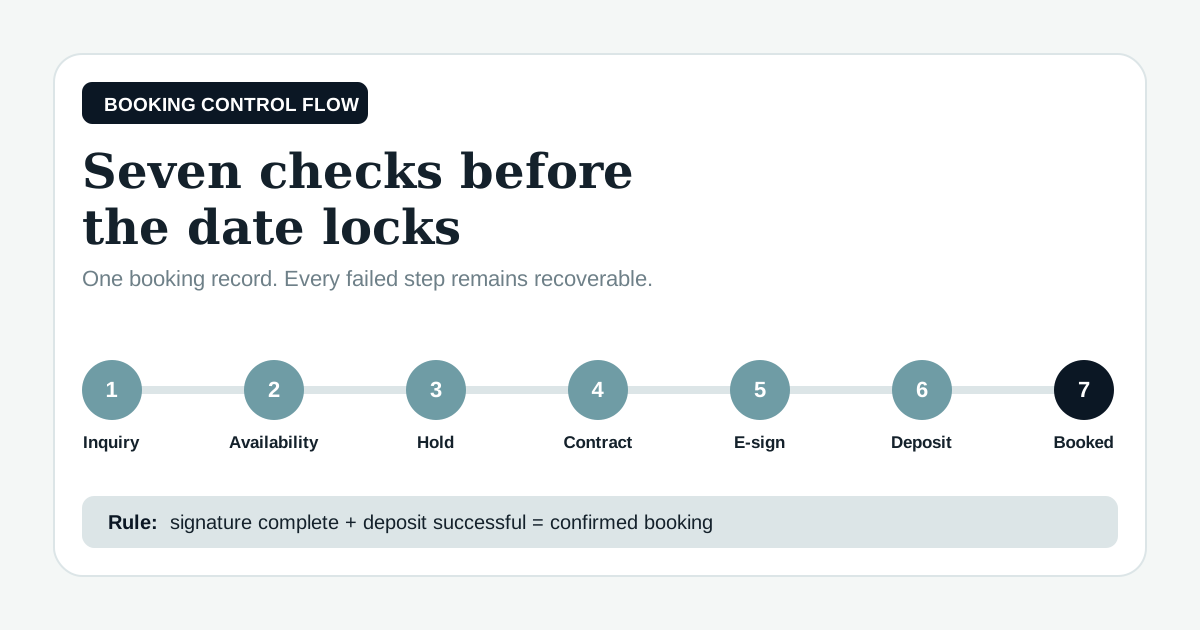
Venue booking software should carry one booking from inquiry to a temporary date hold, an e-signed contract, a paid deposit, and then a confirmed calendar entry. The date should lock only after the venue's own rules are satisfied, usually both a signature and a successful deposit, while every failed step leaves the record recoverable. That connected state change is what separates venue booking software from a calendar with payment links attached.
The search results for venue booking software mostly lead to product pages. Here, we're looking at the operating sequence and the point where each handoff can fail. VenueBill's product pages list tentative date holds, deposits, event-date payment schedules, e-sign contracts, and a couple portal in the same workflow. We build VenueBill, so product details here come from our published pages and should be read with that interest in mind.
What should happen from inquiry to confirmed booking?
A venue booking software workflow should pass through seven distinct states, and the system should record who moved it forward and when.
| Step | Booking state | Proof required to advance | Common failure |
|---|---|---|---|
| 1. Inquiry | New lead | Client, date, space, and contact details | Duplicate or incomplete lead |
| 2. Availability | Date checked | No conflicting hold or booking | Another calendar has the date |
| 3. Hold | Temporarily reserved | Written expiration time | Hold never expires |
| 4. Contract | Awaiting signature | Correct package, total, and terms | Old price or wrong space |
| 5. E-sign | Signed, unpaid | All required signatures and audit record | One signer stops halfway |
| 6. Deposit | Payment pending | Successful charge or recorded cleared payment | Card declines or bank transfer is unverified |
| 7. Confirmation | Booked | Contract and deposit rules both satisfied | Calendar locks too early |
This sequence is the practical core of event venue booking and invoice software. Each state needs a visible owner, a timestamp, and a next action. Otherwise the venue still has to reconstruct the story from email.
How should venue booking software capture the inquiry?
Venue booking software should create one lead record with the client's name, email, phone, requested date, guest count, and requested space. Staff should search for an existing client and event before creating another record. A duplicate inquiry can become two proposals, two holds, or two staff members promising different terms.
Keep the date as requested at this stage. An inquiry is evidence of interest, not permission to remove the date from sale. The record should show the next action, such as reply, tour, or availability check, without changing the calendar to booked.
How should the software check availability?
The venue reservation software should check the exact date, space, setup window, event hours, and breakdown buffer against every active hold and confirmed event. A multi-space property can have the garden open while the ballroom is booked, so a date-only check is too blunt.
The failure case matters here. If another coordinator placed a hold five minutes earlier, the second user should see a conflict before sending a proposal. VenueBill's booking and billing features describe a calendar that keeps confirmed events and tentative holds together, including separate spaces on the same day.
When should a date hold start and expire?
A date hold should start only after a staff member chooses an expiration, and it should release automatically at that time unless the booking advances. Put the deadline in the client message and on the internal record. A quiet hold with no clock can block a valuable Saturday after the couple has moved on.
A second inquiry for the held date needs a defined path. Staff can offer another date, queue the new lead, or invoke a first-right-of-refusal rule if the contract allows it. The software should never let a coordinator erase the first hold without leaving a history.
What should the contract pull from the booking?
The contract should pull the client names, event date, space, hours, package, total price, deposit, and payment schedule from the approved booking record. Staff should review those fields before sending. Retyping them into a separate document invites a mismatch between the calendar, agreement, and invoice.
Version control belongs in this step. If the couple adds a $700 ceremony package after the tour, the $8,400 total in the example below becomes $9,100 everywhere, including the deposit calculation if the deposit is percentage-based. The older draft should remain available for the audit trail without being signable.
Is an electronic venue contract enforceable?
An electronic venue contract generally cannot be denied legal effect solely because it is electronic under the federal E-SIGN Act, although contract requirements and exceptions still apply. Public Law 106-229 says a contract may not be denied enforceability “solely because it is in electronic form.” A venue should still have local counsel review its agreement and signature process.
The software should retain the signed document, signature timestamps, signer identity, and the version each person accepted. If two clients must sign, the state remains awaiting signature until both finish. One signature should not trigger a booked date when the venue's rule calls for two.
When should the deposit lock the date?
The deposit should lock the date after the contract requirement is met and the payment succeeds. A card authorization that declines leaves the hold active until its deadline; it does not create a confirmed booking. A check or bank transfer should remain pending until staff records that the funds cleared under the venue's policy.
VenueBill publishes Pro $39, Premium $59. Both are monthly plans with a card-required 14-day trial. The VenueBill pricing page says Pro includes event bookings, invoicing, deposits, payment schedules, e-sign contracts, and tentative date holds. Premium adds operations for properties that need multi-space or multi-day bookings.
What does a complete booking confirmation include?
A complete booking confirmation names the date, space, contract status, deposit received, total balance, and next due date. It should reach the couple and update the shared calendar from held to booked in the same transaction. If email delivery fails, the booking stays confirmed while the message becomes a retry task.
That distinction prevents a communication problem from reopening inventory. The couple can use the portal or request another email, while staff still see the date as sold. The VenueBill software FAQs explain how the booking calendar, payment schedule, and couple portal fit together after confirmation.
How does the full flow work with real numbers?
A sample venue quotes an $8,400 Saturday package and uses a 25% booking deposit. The software calculates a $2,100 deposit and a $6,300 remaining balance. The venue sets a six-day hold that expires at 5:00 p.m. local time.
| Event | Amount or deadline | System result |
|---|---|---|
| Hold created Monday at 11:00 a.m. | Expires Sunday at 5:00 p.m. | Date shows held, not booked |
| Contract sent Tuesday | $8,400 total | Correct version becomes signable |
| Both clients sign Wednesday | 2 signatures complete | Status becomes signed, deposit due |
| First card attempt declines | $2,100 unpaid | Hold remains until Sunday |
| Second card succeeds Thursday | $2,100 received | Date changes to booked |
| Remaining schedule created | 3 payments of $2,100 | $6,300 balance tied to event date |
The arithmetic is simple: $8,400 × 25% = $2,100, and $8,400 − $2,100 = $6,300. The revealing line is the failed card attempt. The software preserves the signed contract, the hold deadline, and the chance to retry payment without making staff rebuild the booking.
How should you test venue booking software before buying?
Test venue booking software with one fake booking that fails twice: create a conflicting hold, then use a payment method that declines in the vendor's test mode. Confirm that the conflict is blocked, the decline does not mark the date booked, and a successful retry advances the same record. Then download the signed contract and verify the calendar, deposit, and balance all name the same event.
Frequently Asked Questions
Quick answers to the questions readers ask most about this topic.
What is venue booking software?
When should venue booking software mark a date as booked?
What happens if a deposit payment fails after the contract is signed?
Does VenueBill include e-sign contracts and date holds?
Put your next booking on a payment schedule
Keep the couple, event date, deposit, contract, and final balance together. Create your account, set up your venue, and start with one event.
14-day trial, card required. Pro is $39/month, Premium is $59/month. Your selected plan starts after the trial unless you cancel.
More from the blog
Managing Date Holds and Avoiding Double Bookings at Your Venue
How to run date holds at your wedding venue without double bookings: hold policies, expiration rules, and a shared booking calendar that keeps dates straight.
How E-Sign Speeds Up Wedding Venue Contracts (and Locks the Date)
How e-sign for wedding venue contracts closes bookings faster by tying the signature to the date-hold, so couples sign and pay the deposit in one sitting.
Tentative Hold vs Confirmed Booking: Managing Venue Date Holds
Understand tentative hold vs confirmed booking at your venue: how soft holds work, when they expire, and how a deposit turns a maybe into a locked date.
Compare VenueBill for venue operations
See how VenueBill fits alongside the tools wedding and event venues consider for bookings and billing.